


Clean Junk Plus
3.613.00 Reviews
App Specs
- Version
- 1.0.1
- Updated On
- License
- Free
- Downloads
- 100,000+
- Developer
- Hatif Welfare Apps
- Categories
- Tools
- Platform
- Android
Screenshots
 Analysis by AppCompare
When my phone starts feeling cluttered, I usually want a simple answer rather than a complicated maintenance suite. Clean Junk Plus is built around that straightforward idea: care for the phone by dealing with unnecessary files and keeping everyday use feeling smoother. It is a free tools app from Hatif Welfare Apps, aimed at an Everyone audience, and its short store description is simply “Clean Junk Plus.” That tells me the focus is practical rather than decorative.
I approached it as a lightweight cleaning companion, not as a complete security product or a replacement for the phone’s settings. That distinction matters. A cleaner can be useful when storage is crowded or when I want one place to begin a basic tidy-up, but it cannot magically improve every part of a phone. My experience with this app is best understood in that context: it offers a focused starting point for maintenance, while the phone’s own storage controls remain important for decisions that need more detail.
How the current version fits into everyday phone care
The current release is version 1.0.1, so I see it as an early-stage product rather than a mature utility with years of accumulated polish. Its public reach is already meaningful, with over 100 thousand installs, while the average rating sits at 3.5 from roughly 100 ratings and 13 written reviews. Those figures suggest that people are trying it, but the feedback picture is still fairly small and mixed enough to encourage realistic expectations.
The app’s main appeal is its narrow purpose. Instead of asking me to learn a large dashboard, it presents itself as a tool for dealing with phone clutter. That can be convenient after downloading several apps, receiving many media files, or using a device for a long time without checking what is taking up space. I appreciate this kind of focused approach because maintenance tasks are easiest to complete when the app does not distract me with unrelated features.
At the same time, “junk” is not always an obvious category. A temporary file may be safe to remove, while a downloaded document, an old voice recording, or a photo that looks unimportant at first glance may still matter. My most important advice is to treat any cleaning result as a suggestion, not an automatic command. I would review what is selected before confirming a deletion, especially on a phone used for work, study, or family memories.
A realistic use case for a busy phone
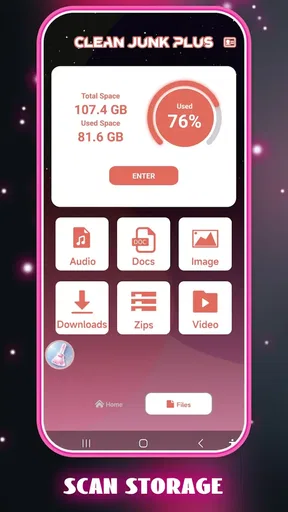
Imagine returning from a trip with a nearly full device. There may be duplicate-looking images, cached media from messaging apps, forgotten downloads, and several applications installed for one-time use. In that situation, I would use Clean Junk Plus as the first pass. I would open it, inspect the cleanup categories it presents, remove only items I recognize as disposable, and then use the phone’s own storage screen to decide whether large personal files or unused apps need separate attention.
That workflow is safer than pressing a single button and assuming every result is worthless. It also shows where the app is most useful: not as a substitute for personal organization, but as a prompt that helps me begin. The app can reduce the friction of starting a cleanup session, while I remain responsible for files that have personal value.
Worth Reading Before You Choose

EA SPORTS FC Mobile 26 Is a Bigger Football Game, but It Takes Time

Flipboard Shows What News Apps Must Do Beyond the Feed

Switching to Android Auto Means Rethinking Your Driving Routine

Google Calendar Makes a Crowded Week Easier to Manage

Ludo King Makes the Most of the Minutes Between Plans

Baby Panda World Brings Quick Play to Modern Phones, but Its Game Library Feels Busy
For someone who repeatedly postpones phone maintenance, that small reduction in effort can be worthwhile. A dedicated tool gives the task a clear place in the routine. I would be more likely to run a quick check before a long journey, before recording a large event, or when an update fails because storage is tight. The benefit is less about dramatic transformation and more about making an ignored chore easier to approach.
What the release information tells me about its evolution
The release date is listed as July 31, 2026, and the current version remains 1.0.1. I would read that combination as evidence of a very young product line. It may be receiving early corrections or small refinements, but I would not assume that a long list of advanced controls has already been established. The sensible expectation is a basic cleaning experience that may evolve as more people use it and report problems.
That early status affects how I judge the app. I am more forgiving of a plain interface or a limited range of controls in a first release, but I am also more careful about relying on it for important cleanup work. Early utilities need to earn trust through clear explanations, predictable scanning, and careful deletion choices. Those are more valuable to me than a crowded feature list.
The move to version 1.0.1 is worth watching because small version changes can shape the daily experience even when they do not introduce headline features. Improvements to scan clarity, selection controls, stability, or the way results are explained would have a direct effect on confidence. I would check the version shown on my device before assuming that another review describes the same behavior, particularly because this product is still near its beginning.
How existing users should approach the update
If I were already using the app, I would not change my whole phone-care routine immediately after seeing version 1.0.1. I would first compare how the current release presents its results with what I remember, then perform a small cleanup involving files I can easily identify. This is a useful habit with any system utility: test the workflow on low-risk material before making it part of a regular maintenance schedule.
I would also keep the phone’s built-in storage manager available. Android’s native tools are usually the better place to understand which applications, photos, videos, and documents occupy the most room. Clean Junk Plus can serve as a convenient cleaning layer, but the operating system remains the more authoritative source when I need a complete storage breakdown or want to uninstall an app.
Existing users should pay attention to whether the app makes selections understandable. A good cleanup session should leave me knowing what I am about to remove, not merely showing an attractive amount of recoverable space. If a result is vague, I would skip it and investigate through the file manager or the original app that created it. That extra minute is worthwhile when the alternative is losing something difficult to restore.
There is another practical trade-off for people who keep a phone for years. Cleaning temporary clutter can help create breathing room, but it does not solve an oversized photo library, a growing video folder, or an app that stores large offline content. If the same storage warning returns quickly, I would stop repeating the same cleanup and look for the real source. In that case, moving personal media, deleting old downloads manually, or removing unused applications is likely to achieve more.
Where it is a better fit than usual alternatives
The usual alternatives are the phone’s own storage tools, a file manager, or a broader device-maintenance suite. Clean Junk Plus is more appealing than a file manager when I want a guided starting point instead of manually browsing folders. It can also feel less overwhelming than a large suite that combines cleaning with unrelated tools I may never use.
The built-in option is stronger when I need precision. It normally gives me a clearer view of app sizes and personal files, which is essential before making major storage decisions. A file manager is better when I already know the folder or document I want to remove. A broader suite may be preferable for someone seeking several maintenance functions in one place, provided that person is comfortable reviewing more settings.
My choice would therefore depend on the task. For a quick clutter check, I would try Clean Junk Plus. For a deep storage audit, I would go straight to system settings. For organizing photographs or documents, I would use the relevant gallery or file tool. The app’s value comes from convenience and focus, not from replacing every other method.
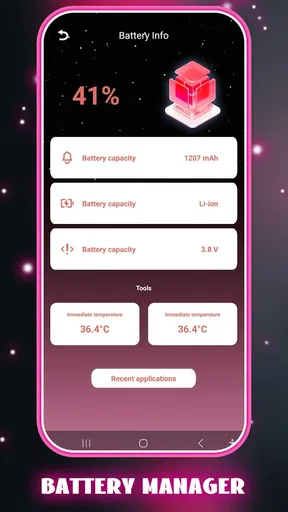
I would also skip it if I expect a cleaner to repair a slow phone caused by an aging battery, demanding applications, weak network service, or limited hardware. Removing unnecessary files can help with storage pressure, but it cannot correct every performance complaint. Likewise, anyone who wants a detailed privacy audit, malware protection, backup management, or advanced automation should choose a tool designed specifically for those jobs rather than treating this utility as a universal solution.
Small workflow choices that make the app safer
My first tip is to clean in stages. I would begin with clearly disposable temporary material, review the result, and only then consider less obvious categories. This prevents the common mistake of treating every item grouped under a broad label as equally safe. If the app offers a selection screen, I would use it rather than accepting the entire recommendation without inspection.
My second tip is to run the app at a useful moment, not constantly. A check before installing a large application or leaving for a trip makes the result actionable. Running a cleaner repeatedly without a storage problem can add unnecessary steps and may encourage me to delete files merely because they are listed. Maintenance should follow a real need, such as low space or a deliberately planned tidy-up.
My third tip is to remember where important files came from. If I see a large item associated with a messaging, video, or offline-reading app, I would open that original app first and decide whether the content is still needed. Deleting from the source application can sometimes be clearer than removing an item from a general cleaning screen, because I understand its purpose and can often download it again if necessary.
Finally, I would keep a simple personal rule: never use a cleaning session as the only copy of something important. Before removing documents or irreplaceable media, I would make sure they are backed up or intentionally no longer needed. This is not a criticism unique to Clean Junk Plus; it is the basic discipline required whenever a tool offers to remove files on my behalf.
Remaining gaps and the details I would watch
The biggest limitation for me is the trust gap that naturally surrounds a young cleaning utility. I want clear categories, understandable explanations, and confident control over every deletion. If any part of the process feels too automatic or too vague, the app becomes less useful because I have to verify everything elsewhere. Convenience only counts when it does not create uncertainty.
I would also watch how well the app handles phones with different storage layouts and different kinds of user data. A cleaner needs to be helpful without flattening important distinctions between disposable cache, downloaded content, and personal files. The more clearly it communicates those differences, the more comfortable I would feel recommending it to someone who is not technically experienced.
Future progress should be judged by practical improvements rather than by adding more buttons. Better explanations, safer default selections, an easy way to exclude folders, and a transparent review step would matter more to me than decorative dashboards. If later releases make those parts clearer, the app could become a dependable routine tool instead of something I open only when storage pressure becomes urgent.
I would also look for a smoother relationship with the operating system’s own tools. The best experience would let me use Clean Junk Plus for a quick overview while still directing me toward system settings when a decision requires deeper detail. That balance would help beginners without frustrating experienced users who want control.
My recommendation after using it
Clean Junk Plus is a reasonable choice for someone who wants a free, focused way to begin cleaning a crowded phone. Its Everyone content rating makes it approachable for a broad audience, and Hatif Welfare Apps has kept the concept easy to understand: look for unnecessary clutter, review it, and make room when appropriate. I like that it does not need to be treated as a complicated technical project.
My recommendation comes with a clear condition: use it as an assistant, not as an unquestioned deletion button. The phone’s native storage controls, a file manager, and the original apps that created downloads still have important roles. If I needed a quick first step, I would keep this app in consideration. If I needed a full storage audit, privacy protection, backup planning, or guaranteed answers about every file, I would choose a more specialized route.
Because version 1.0.1 belongs to an early phase of the product, I would watch future releases for clearer cleanup explanations and stronger user control. Those changes would determine whether it grows from a convenient basic tool into something I would rely on regularly. For now, its best audience is someone who wants a simple nudge toward better phone housekeeping and is willing to review the results carefully.
In short, I see Clean Junk Plus as a useful first pass for everyday clutter, especially before a storage-sensitive task. It can make the beginning of a cleanup less intimidating, but the final decision should remain personal and informed. Used with that restraint, it has a sensible place among the lighter tools I would recommend to a friend.
Pros
- Quickly identifies cached files and other removable junk.
- Simple interface makes cleanup easy for less experienced users.
- Can help free storage space without deleting personal files.
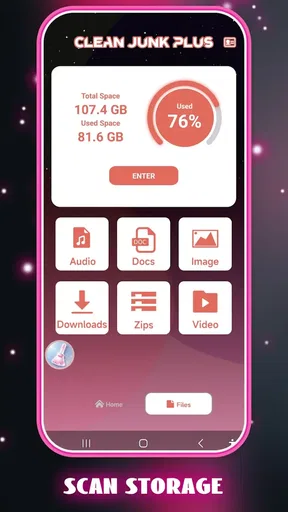
- Useful overview of storage usage before starting a cleanup.
- Lightweight design should have minimal impact on device performance.
Cons
- Some suggested files may require careful review before deletion.
- Cleanup results can vary depending on the device and Android version.
- Frequent scans may offer limited benefits on devices with ample storage.
- Extra permissions may be needed for deeper storage analysis.
- Ads or upgrade prompts may interrupt the free cleaning experience.
FAQs for Clean Junk Plus
What is Clean Junk Plus and what does it do?
Clean Junk Plus is designed to help users remove unnecessary files from an Android or iOS device and recover storage space. Depending on the version and device permissions, it may identify cached data, temporary files, duplicate items, large files, or unused content. It is intended as a storage-management utility, not a complete replacement for the device’s built-in settings or a guaranteed performance booster.
Is Clean Junk Plus safe to use on my phone?
Clean Junk Plus can be useful when you review its scan results carefully before deleting anything. Cleaning applications commonly request access to storage, photos, or other device data, so you should check the permissions and privacy information before continuing. Avoid approving automatic deletion if you have not examined the selected files, and keep backups of important photos, documents, downloads, and media.
Can Clean Junk Plus improve my phone’s performance?
The application may make a device feel less cluttered by removing temporary files and freeing storage, especially when the phone is nearly full. However, it cannot fix every cause of slow performance, such as an aging battery, outdated hardware, poor network connectivity, or demanding background applications. Results will vary, and regularly deleting cache files may provide only a temporary benefit.
Will Clean Junk Plus delete my personal photos, videos, or important files?
Clean Junk Plus should not be used without checking the files selected for removal. Storage cleaners can sometimes classify large files, duplicate media, downloads, or unused content as items that may be deleted. Before confirming a cleanup, review each category carefully and exclude anything you want to keep. If the app offers a recycle bin or recovery option, treat it as helpful but not as a substitute for backups.
Is Clean Junk Plus free, and does it contain advertisements or subscriptions?
The availability of free tools, advertisements, premium features, and subscriptions may depend on the version downloaded and the platform’s current store listing. Before installing, review the app’s pricing section, in-app purchase details, and subscription terms. If a trial is offered, check its renewal date and cancellation instructions. Do not assume that every cleaning feature is included in the free version.


